
Screenshots
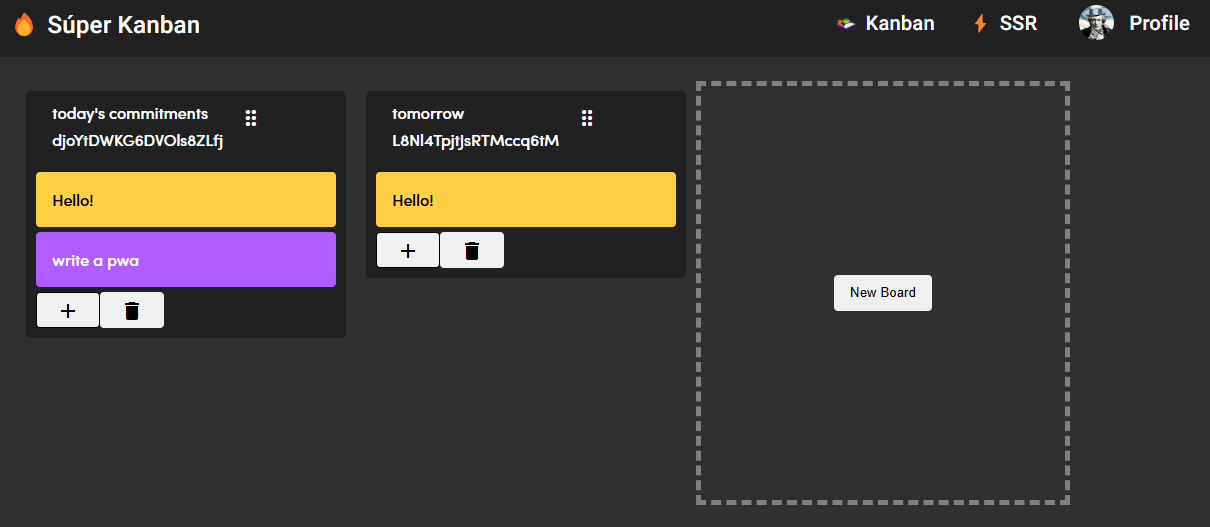
App details
- Updated
- 2024-12-11T18:21:49.2786717Z
- Requires
- Windows 10 version 16299.0 or higher
- Language
- English
- Developer
- Juan Montilla
- Category
- Mobile
SoftPas in:
This product is also available in the following languages:
About super-kanban
Download Super-Kanban – Task Manager, Kanban, Productivity Tool, Project Management, Workflow Organization
Overview
Super-Kanban is a productivity-focused mobile application designed to simplify task management through the widely adopted Kanban methodology. Its primary purpose is to help users visualize workflows, organize tasks across different stages, and maintain consistent progress tracking. Whether used for personal planning, academic projects, or team-based work, the app offers a structured yet flexible framework for managing daily responsibilities. By breaking down complex workflows into manageable columns—such as To-Do, In Progress, and Done—Super-Kanban enables users to gain clarity and reduce mental clutter. The app is particularly beneficial for individuals and small teams seeking a lightweight yet effective tool for staying on track without overwhelming complexity.
Target users include students, freelancers, remote workers, and small business teams who rely on visual task organization to improve focus and efficiency. The developer, Super-Kanban Team, has positioned the app as a user-centric solution that prioritizes intuitive navigation and seamless task movement. While specific background details about the team are not publicly available, the app’s design reflects a clear understanding of modern workflow challenges. Real-world use cases range from managing daily to-do lists and personal goals to coordinating collaborative projects across distributed team members. In the broader app ecosystem, Super-Kanban fills a niche for accessible, no-frills Kanban tools that emphasize simplicity and functionality over feature bloat.
Key Features & Functionality
- Intuitive Interface: The app features a clean, minimalistic layout that allows users to quickly grasp its structure. Navigation is streamlined through clearly labeled columns and touch-friendly elements, reducing the learning curve for new users.
- Drag-and-Drop Functionality: Tasks can be moved between lists with simple gestures, enabling real-time adjustments to priorities and workflow stages. This feature supports dynamic planning, especially when deadlines shift or new tasks emerge.
- Collaboration Tools: Team members can share boards, assign tasks, and leave comments, making it suitable for remote or hybrid work environments where communication transparency is essential.
- Customizable Boards: Users can create custom lists, apply color codes, and use personal labels to categorize tasks by project, urgency, or type, allowing for personalized workflow adaptation.
- Progress Tracking: Built-in visual indicators provide insight into task completion rates and overall project timelines, helping users assess productivity and identify bottlenecks.
For example, a student managing multiple assignments can use color-coded labels to distinguish between subjects and drag tasks between “To-Do” and “In Progress” as work begins. A remote team can assign tasks to specific members and track updates via comments, ensuring accountability and alignment across time zones. These features collectively support efficient workflow management without requiring extensive training or technical setup.
Interface, UX & Performance
Super-Kanban’s user interface emphasizes clarity and ease of use, with a layout that organizes tasks into vertical columns representing workflow stages. The visual style is modern and uncluttered, using soft colors and consistent spacing to enhance readability. Navigation is straightforward, allowing users to access boards, create new tasks, and adjust settings with minimal taps. The drag-and-drop interaction is smooth and responsive, contributing to a fluid user experience.
Although the developer did not list formal performance metrics, the app’s lightweight design—only 24.3 MB in size—suggests optimized resource usage. This likely contributes to fast load times and minimal battery drain, even on mid-range Android devices. Responsiveness appears consistent across different screen sizes, though detailed device-specific testing was not disclosed. Stability is expected to be reliable given the app’s focused feature set and absence of known third-party integrations. The developer did not provide additional technical details regarding background processes or memory consumption.
Platform Compatibility & Technical Requirements
Super-Kanban is available exclusively on the Android platform. The current version is 1.0.0, released on December 11, 2024. The app has a file size of 24.3 MB, which is compact for a productivity tool with visual task management features. While the developer did not specify minimum OS requirements, the app is likely compatible with recent Android versions, given its modern interface and gesture-based functionality. Specific hardware or device compatibility was not listed. Users should ensure their device meets standard Android system requirements for running third-party applications.
Pros and Cons
Pros
- Simple, intuitive interface suitable for beginners and experienced users alike
- Efficient drag-and-drop task management for real-time workflow adjustments
- Supports team collaboration with task assignment and commenting
- Highly customizable boards with labels, colors, and dynamic lists
- Lightweight design with minimal storage footprint
Cons
- No information provided on cloud sync or cross-device access
- Collaboration features may be limited without additional premium tiers
- Platform availability restricted to Android only
- Specific performance benchmarks or device compatibility details not disclosed
- Long-term update frequency or roadmap not publicly shared
FAQ
Is Super-Kanban free to download and use?
Yes, Super-Kanban is available at no cost. The app is currently offered as a free tool with no in-app purchases or subscription fees mentioned in the release details.
Can I use Super-Kanban on iOS devices?
As of now, the app is only available on Android. There is no official iOS version or indication of future release plans.
Does Super-Kanban support cloud synchronization?
The developer did not disclose whether the app includes cloud sync functionality. Users should assume local storage unless otherwise confirmed.
How often is Super-Kanban updated?
Specific update frequency has not been shared. The current version is 1.0.0, released on December 11, 2024. Future updates will depend on the development team’s roadmap.
Is Super-Kanban secure for storing personal or team data?
While no security details were provided, the app’s lightweight nature and lack of third-party integrations suggest minimal data exposure. Users are advised to review privacy policies and permissions before use.
Final Thoughts
Super-Kanban delivers a focused, no-nonsense approach to task management that aligns well with modern productivity demands. Its clean interface, customizable boards, and collaboration-ready features make it a strong choice for individuals and small teams looking to organize their workflows efficiently. The app’s lightweight design and free access further enhance its appeal, especially for users who value simplicity and speed. While platform exclusivity to Android and limited public details on sync and updates are notable considerations, the core functionality remains robust and reliable. For anyone seeking a straightforward Kanban-based tool to boost focus and project visibility, Super-Kanban offers real value without unnecessary complexity.
Download Super-Kanban now
Guides & Tutorials
How to install super-kanban
- Click the Download button above.
- Once redirected, accept the terms and click Install.
- Wait for the super-kanban download to finish on your device.
How to use super-kanban
This software is primarily used for its core features described above. Open the app after installation to explore its capabilities.
User Reviews
No reviews yet. Be the first to share your experience.
You may also like
more
Que no te pillen¡
About !Que no te pillen¡Reviewed by Jason A. BilbreyShow MoreShow Less

3D Combat Zone
About 3D Combat ZoneOriginally released in 1983, 3D Combat Zone immerses players...

666: El día del portal
About 666: El día del portalOn June 6, 2006, Agent P. Stone uncovers a sinister...

80 in 1 Best Flash games
About 80 in 1 Best Flash games 80 in 1 Best Flash games is a collection of 80 fl...

ABYSS SEEKERーーWhat Do You See Deep in The Abyss
About ABYSS SEEKERーーWhat Do You See Deep in The AbyssIn ABYSS SEEKER, players...

ACA NEOGEO THE KING OF FIGHTERS 2002 for Windows
About ACA NEOGEO THE KING OF FIGHTERS 2002 for WindowsTHE KING OF FIGHTERS 2002,...